
Version 1.8 is here.
This release lays the groundwork for subscribing to Snug on your iPhone and iPad, and it also brings faster file uploads, notes for your saved places, and a batch of polish across the app.
Key features
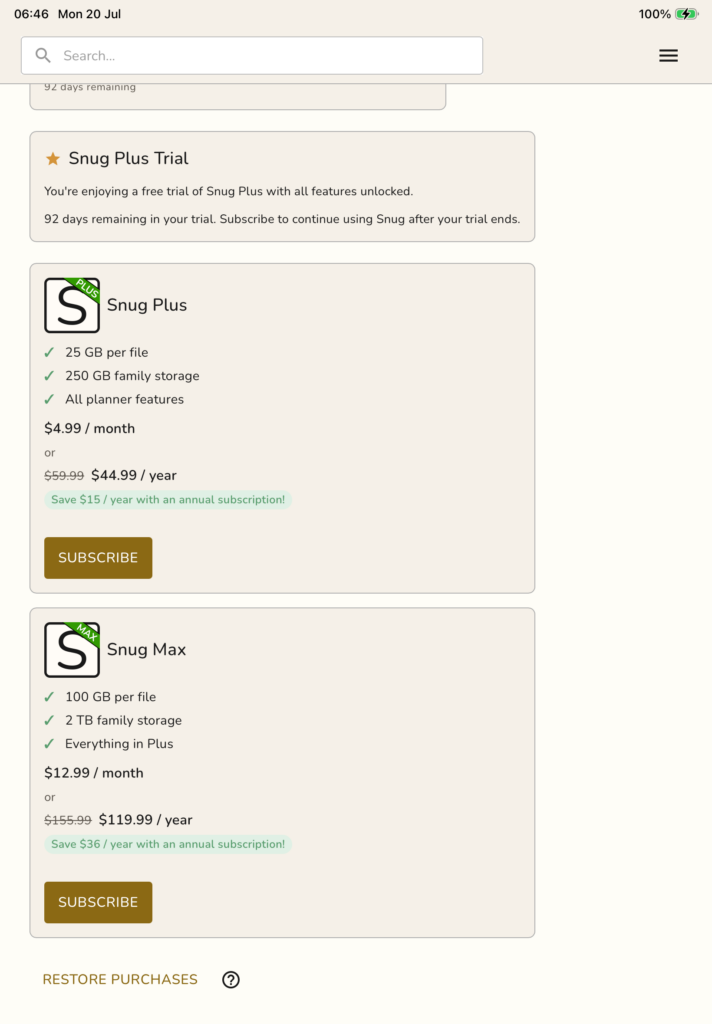
In-app subscriptions coming soon to iPhone and iPad
We use Stripe for our Android and web app. Apple does not allow this. Subscriptions must be managed via their App Store billing system.
So, we built it.
We are putting the finishing touches on in-app subscriptions for iOS. Very soon you will be able to start Snug Plus or Snug Max, switch between monthly and yearly, move up to Max or back down to Plus, and manage it all through the App Store without ever leaving Snug.
Restoring a previous subscription will be a single tap, and in most cases Snug will bring it back automatically when you sign in. Your billing screen will also show exactly when your plan renews and any change scheduled for the next renewal.
Keep an eye out, the iOS app is nearly ready.
Faster, steadier file uploads
Uploading files is noticeably quicker and more reliable, especially with larger batches, and emptying the trash is snappier too. Fewer stalls, less waiting.
Fixes and improvements
- Location notes are now shown in their list view.
- Dropdown menus and dialogs open more precisely and feel smoother throughout the app.
- Signing in is more forgiving. Your email address is no longer treated as case sensitive when you register, so there is no more accidental mismatch at login.
- Snug is now listed on the official MCP registry, making it a little easier to connect an AI assistant like Claude or ChatGPT to your planner.
- A handful of visual and stability fixes across the app.
As always, thank you for using Snug. We would love to hear what you think.
Drop us an email at [email protected] with any feedback you might have.
Leave a Reply